Space Hospitality API
The Space Hospitality API provides integration capabilities for hospitality management systems to work with the Salto Space access control platform as a credential provider for Apple Wallet.
Features
- Digital room keys: Create and manage Apple Wallet keys for hotel rooms
- Key lifecycle management: List, retrieve, and delete individual room keys
- Provision token generation: Generate tokens for wallet key provisioning
- Guest management: Handle check-in and check-out operations with automatic key invalidation
- Security: Bearer token authentication for secure access
- Immediate operations: Instant key activation, deactivation, and room status changes
Solution architecture
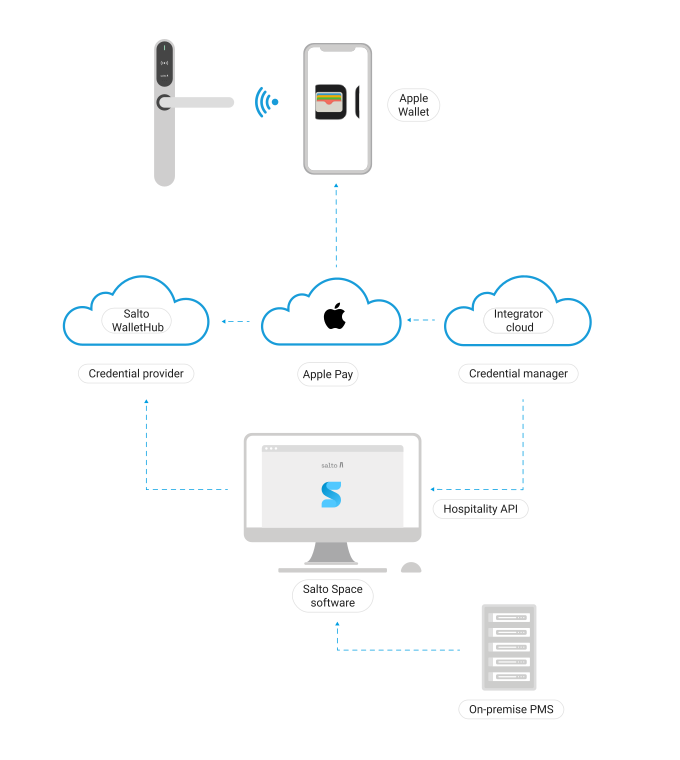 Space Hospitality API architecture
The Hospitality API integration requires coordination between three key components:
- Credential Manager Service: Your hospitality management system that initiates wallet key requests
- Salto Space: The access control platform that manages credentials and hardware
- Salto WalletHub: Salto's cloud service that handles Apple Wallet key provisioning
Prerequisites
Before you begin integration, ensure the following requirements are met:
Space installation requirements
The property's Space installation must have:
- Space version: 6.10 or later (6.12+ recommended for full feature support)
- Required licenses:
SPACE-OPT-0041: Wallet Guest KeysSPACE-OPT-0030: Web Services Defined by User (required for development/testing environments)
- Hardware: Compatible NFC-enabled Salto devices with required firmware versions
- NCoder dongle: At least one Ethernet NCoder (firmware 0172, version 01.15 or higher) working in dongle mode
See the Space user guide for more details.
Network configuration
The property's network must allow:
- Inbound connections: From your credential manager service to the Space Hospitality API endpoint
- Firewall rules: Configured to accept requests from your service's IP addresses
- TLS certificate: Valid certificate for the Space Hospitality API endpoint
See Connectivity considerations for detailed network configuration.
Configuration values
You will need to provide or obtain the following values:
To provide to Salto/property:
- Your credential manager service's IP address and port (for firewall rules)
- Your TCI (Tag Class Identifier): A unique 3-byte (6 hexadecimal character) identifier for wallet pass identification
To obtain from Salto/property:
- Space Hospitality API endpoint URL (public IP or domain) and port
- API authentication key (generated in Space)
- WalletHub credentials (provided by Salto for production; separate credentials for development)
Getting started
Environment setup
Two environments are available for integration:
Development environment:
- WalletHub URI:
https://dev.wallethub.saltoapis.com - WalletHub Account URI:
https://dev.account.saltosystems.com - Use for initial development and testing
- Requires
SPACE-OPT-0030license to configure custom URIs
Production environment:
- WalletHub URI:
https://wallethub.saltoapis.com - WalletHub Account URI:
https://account.saltosystems.com - Use for live deployments
- Default configuration in Space
Space configuration
The property's Space installation must be configured as follows:
Hospitality API setup:
- Select Hospitality API (Salto) integration type in System > General options > Wallet keys
- Generate API authentication key
- Configure API port in ProAccess Space Configurator
- Set up TLS certificate
WalletHub configuration:
- Enter WalletHub credentials (provided by Salto)
- Test connection
- Activate the integration
SAM & Issuing configuration:
- Enable Wallet in active keys
- Select Salto as credential provider
- Enter your TCI value
- Generate key using NCoder dongle
See the wallet keys configuration guide for detailed steps.
Authentication
The API uses Bearer token authentication. The API key is generated in Space during the Hospitality API setup and must be included in all API requests:
Authorization: Bearer YOUR_API_KEYContact Salto to coordinate the integration setup and obtain necessary credentials.
Integration workflow
A typical integration workflow follows these steps:
- Property setup: Space installation is configured with all prerequisites met
- Network configuration: Firewall rules allow communication between systems
- Credentials exchange: API keys and TCI values are shared
- Testing: Validate operations in development environment
- Production deployment: Switch to production WalletHub environment
- Operations: Implement check-in/check-out workflows
Key operations
Room check-in
Creates a room access period and invalidates any previous keys for the same room. This ensures only the current guest can access the room.
Key creation
Generate new Apple Wallet keys for specific rooms with defined time periods. Keys are provisioned through Apple Wallet and use NFC to unlock compatible Salto devices.
Key management
List all keys for a room, retrieve individual key details, or delete specific keys as needed. Useful for troubleshooting and managing guest access.
Provision tokens
Generate time-limited tokens that allow wallet credential retrieval. These tokens are used by the Apple Wallet provisioning flow.
Room check-out
Remove all keys and invalidate room access when a guest checks out. Ensures immediate revocation of access privileges.
Note: This API only supports Apple Wallet keys for hotel guest rooms. Physical cards and staff keys are not supported through this API.
Important considerations
- Character restrictions: The following characters are not allowed in room names and key identifiers:
?,/,:,%,#,\ - Immediate operations: All key operations take effect right away on compatible online devices
- Key lifecycle: Keys are automatically invalidated during check-in or check-out operations
- Network dependency: The Space server must be accessible via the configured Hospitality API endpoint
- TCI uniqueness: Each credential manager integration requires a unique TCI value
Testing hardware
For integration testing purposes, compatible test hardware includes:
- NFC-enabled Salto locks with updated firmware
- NCoder dongle (firmware 0172, version 01.15+)
- Apple devices with Wallet app (iPhone 6S or later, Apple Watch Series 1 or later)
Contact your Salto representative for a complete list of compatible hardware for testing.
Support and troubleshooting
For integration support:
- Review documentation: Check the Space user guide for configuration details
- Verify prerequisites: Ensure all licenses, hardware and network requirements are met
- Check connectivity: Verify firewall rules and endpoint accessibility
- Test credentials: Confirm API keys and WalletHub credentials are correct
- Contact Salto: Reach out to your Salto partner or contact Salto support
When reporting issues, provide:
- Space version and license information
- API request/response details (without sensitive credentials)
- Network configuration details
- Error messages or unexpected behavior descriptions
Download OpenAPI specification
HospitalityService API (YAML): version: 0.0.1
