Event streaming and real-time communication
Overview
Event Streaming is a service available on the Salto KS Connect API, which exposes entries and incidents endpoints that enable real-time communication between server and clients.
This service is tied to KS Connect and is able to serve only tenants belonging to it.
Three different techniques are supported to handle real-time communication, which are implemented in the official ASP.NET Core SignalR library. Besides the library that is being used on the server, SignalR also supports client libraries that are released together with the server components and versioned to match.
Architecture
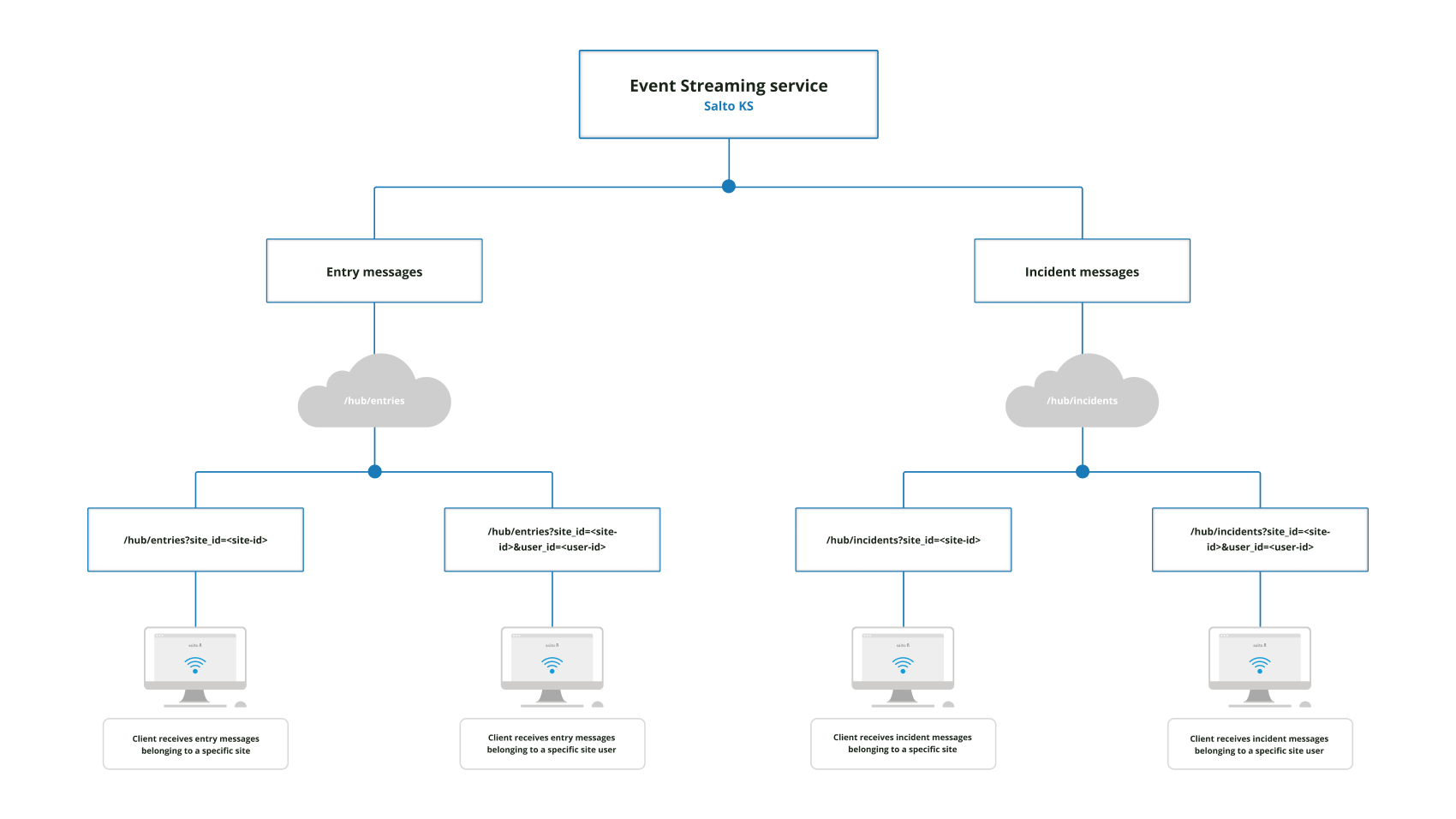 Event Streaming in Salto KS architecture
Public APIs
URLs
Accept: https://eventstreaming-connect-accept.saltoks.com
Production: https://eventstreaming-connect-production.saltoks.com
Real-time endpoints
Endpoint to get all the entries from a specific site:
/v1/hub/entries?site_id={siteId}site_id: this value should be replaced with the unique identifier of the site.
Endpoint to get all the entries from a specific user in the site:
/v1/hub/entries?site_id={siteId}&user_id={userId}site_id: this value should be replaced with the unique identifier of the site.user_id: this value should be replaced with the unique identifier of the user.
It is important to note that the above endpoints are protected and, therefore, require both an authentication and authorization to be performed. The token retrieved for authenticating the connection to the KS Connect API can be reused, as long as the scopes are correctly defined.
Once the request is successfully authorized and the exchange technique is negotiated by SignalR, the connection to retrieve the real-time data will be established.
Authentication
Once the JWT (JSON Web Token) access token is retrieved from the KS Identity Server, it will need to be passed in one of the two following ways:
Authorizationheader with valueBearer {accessToken}access_tokenquery parameters with only token value?access_token={accessToken}
If the authentication is successful, the server will proceed to authorize the request.
For invalid or expired tokens, a 401 Unauthorized message will be returned.
Authorization
The allowed scope is user_api.full_access
- JWT
scopesclaim
The viewing permissions depend on the user's role:
Site entries can be viewed by Site Admins and Site Super Users.
Site user entries can be viewed by Site Admins, Site Super Users, and Site Users (the latter is only able to view their own entries).
Site incidents can be viewed by Site Admins and Site Super Users.
Site user incidents can be viewed by Site Admins, Site Super Users, and Site Users (the latter is only able to view their own incidents).
If the scope or permission authorization fails, a 403 Forbidden message will be returned.
Transport
Currently, only WebSockets transport is supported by this service, with SkipNegotiation = true.
Code examples
SignalR .NET Client
Sample code using SignalR.NET Client in C#:
using Microsoft.AspNetCore.SignalR.Client;
var token = "ACCESS_TOKEN";
var siteId = "SITE_ID";
var url = $"{streamingEndpointUrl}/v1/hub/entries?site_id={siteId}";
//$"{streamingEndpointUrl}/v1/hub/incidents?site_id={siteId}"
HubConnection connection = new HubConnectionBuilder()
.WithUrl(url, options =>
{
options.AccessTokenProvider = () => token;
options.SkipNegotiation = true;
options.Transports=HttpTransportType.WebSockets;
})
.Build();
connection.On<string>("ReceiveMessage", message =>
{
// incident or entry message
});
await connection.StartAsync();
SignalR JavaScript Client
Sample code using SignalR JavaScript Client:
const token = "ACCESS_TOKEN"
const siteId = "SITE_ID"
const url = `${streamingEndpointUrl}/v1/hub/entries?site_id=${siteId}`
//`${streamingEndpointUrl}/v1/hub/incidents?site_id=${siteId}`
const connection = new signalR.HubConnectionBuilder()
.withUrl(url, {
accessTokenFactory: () => token,
skipNegotiation: true,
transport: signalR.HttpTransportType.WebSockets,
})
.build();
connection.on('ReceiveMessage', (message) => {
// incident or entry message
});
await connection.start();
SignalR Java Client
Sample code using SignalR Java Client:
String url = "URL";
String token = "ACCESS_TOKEN";
HubConnection hubConnection = HubConnectionBuilder.create(url)
.withAccessTokenProvider(Single.defer(() -> {
// Your logic here.
return Single.just(token);
}))
.shouldSkipNegotiate(true)
.build();
hubConnection.on("ReceiveMessage", (message) -> {
System.out.println("New Message: " + message);
}, String.class);
//This is a blocking call
hubConnection.start().blockingAwait();